
Last updated: 08-2026 · By Andrew Fields
Not sure what that glowing symbol on your Harley’s dash is trying to tell you? You’re not alone. You can ride a brand-new Sportster off the lot and catch your first warning light before you’ve gone ten miles – or put on 5,000 trouble-free miles and never see one. Either way, the smart move is to learn the language of your instrument panel before a light surprises you on the side of the road.
This guide breaks down every indicator and warning light you’re likely to see on a Harley-Davidson dash – what each one means, how urgent it is, and what to actually do about it. It applies to Softail, Sportster, Touring, Dyna, and the newer Milwaukee-Eight and Revolution Max models, with notes where things differ by year and gauge type.
Quick safety rule: Green and blue lights are just information. Amber lights are a heads-up – get it checked soon. A red light means stop and check before you keep riding.
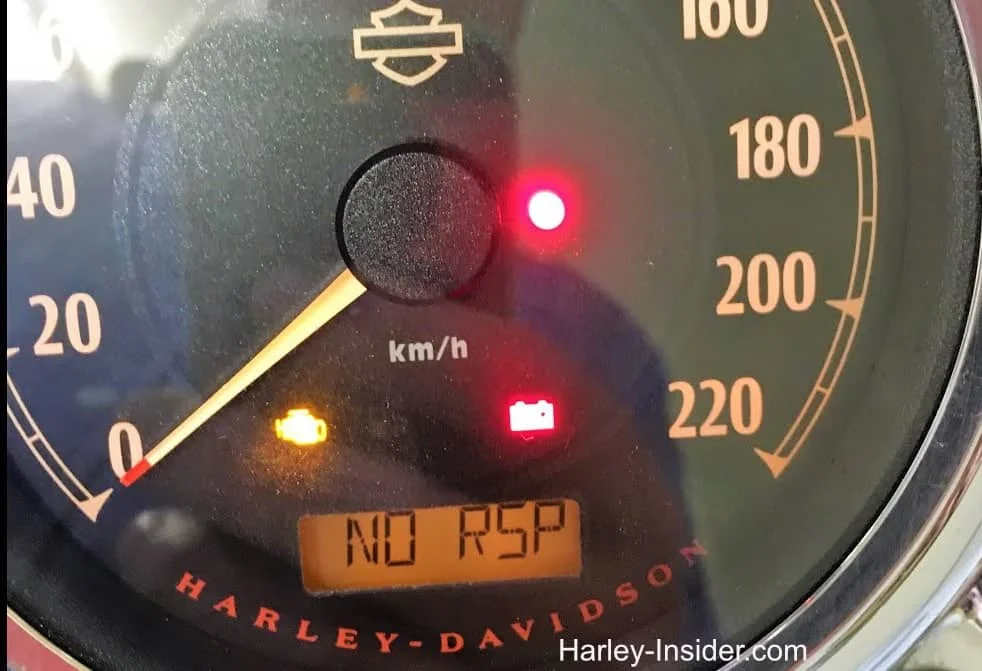
Table of Contents
How Harley dash lights work: the color code
Harley uses a near-universal color system, so once you know the colors you already know how worried to be:
- Green / Blue – Normal operation. These simply tell you a system is active (turn signal, neutral, high beam).
- Amber / Yellow – A pre-warning. Something needs attention soon, but it usually isn’t an emergency. Keep riding cautiously and get it looked at.
- Red – Stop. A red light points to a fault that can leave you stranded or damage the bike (oil pressure, charging, overheating, security). Pull over safely and check before continuing.
One more thing that trips people up: steady vs. flashing. A steady light is a status or a fault to investigate; a flashing light – especially a flashing check-engine light – usually means the problem is active and more serious. When in doubt, treat flashing as “more urgent.”
Quick-reference table: every Harley dash light
| Light / Symbol | Color | What it means | Urgency | What to do |
|---|---|---|---|---|
| Ignition / battery start light | Red | Comes on at key-on, should go out after start | Info → Warning if it stays on | If it stays on while riding, check charging/battery |
| Oil pressure | Red | Low oil pressure or a leak | High – stop | Shut off, check oil level, don’t ride far |
| Engine temperature / coolant | Red or Amber | Overheating (air- or liquid-cooled) | High | Let it cool; check coolant/leaks on Twin-Cooled & Revolution Max |
| Battery / charging | Red | Charging fault or low voltage | High | Test charging system & battery |
| Security / immobilizer | Red | Anti-theft system alert or fob not detected | Medium | Check fob battery; enter security code (see below) |
| Red key light | Red | Battery was disconnected / not relearned | Low–Medium | Reconnect battery fully; may clear after a ride |
| Check engine (MIL) | Amber | Engine/emissions fault stored | Medium–High (High if flashing) | Run a DTC code check |
| Engine management / diagnostic | Amber | Monitors ignition, fuel, intake, exhaust | Medium | Get it scanned soon |
| ABS | Amber | Anti-lock brake self-check or fault | Low–Medium | Normal until ~10–15 mph; if it stays on, service the ABS |
| Traction control (RDRS) | Amber | Traction/stability system active or faulted | Low–Medium | Flashing = system working; steady = have it checked |
| Low fuel | Amber | Reserve fuel level reached | Low | Refuel soon; note your miles-to-empty |
| Tire pressure (TPMS) | Amber | Low tire pressure (equipped models) | Medium | Check and inflate to spec before riding hard |
| Cruise control | Green/Amber | Cruise set or ready (equipped models) | Info | None – status only |
| Neutral | Green | Transmission is in neutral | Info | None |
| Turn signals | Green | Left/right signal active | Info | None |
| Hazard (both signals) | Green | Both signals flashing – hazard | Info | Warn other riders/drivers |
| High beam | Blue | High beam on | Info | None |
| Heated grips (equipped) | Amber | Grips heating active | Info | None |
| Gear position / RPM (digital) | White/Amber | Selected gear or engine speed | Info | None |
Analog vs. digital dashes: why your lights may look different
Not every Harley shows these the same way, and this is where a lot of confusion starts:
- Older/analog clusters (many Sportster, Dyna, and pre-2014 models) use a row of small telltale lamps around the speedometer and tachometer. The lights are simple on/off symbols.
- Modern digital gauges (Rushmore-era Touring, Street Glide/Road Glide with the 4″ or 6.5″ screens, and Revolution Max models like the Sportster S and Pan America) combine telltales with text messages and icons on the screen – you may get a written alert (“ENGINE,” “BATTERY,” “TIP OVER”) in addition to a symbol.
If your bike shows a message you don’t recognize, note the exact wording – it makes diagnosing far faster than a symbol alone. Always cross-check against your model-year owner’s manual, because a handful of symbols (traction control, TPMS, cruise) only exist on equipped trims.
The critical (red) lights – stop and check
Oil pressure
This should stay off while the engine runs. If it glows red, oil pressure has dropped or there’s a leak. Don’t push your luck: shut the engine down as soon as it’s safe, check the oil level, and don’t ride far – running low on oil pressure is one of the fastest ways to destroy an engine.

Engine temperature / overheating
This comes on when the engine is running too hot. On air-cooled Big Twins that can happen in heavy traffic on a hot day; on Twin-Cooled Milwaukee-Eight and Revolution Max bikes it usually points to a coolant problem. Let the engine cool, check for coolant leaks where applicable, top up, and investigate before you ride on – heat around the wiring and fuel system is not something to ignore.
Battery / charging
A red battery or charging light means the system isn’t keeping the battery topped up. It often shows when voltage stays low for several minutes. Have the charging system tested (stator, regulator) and confirm you’re running the correct battery for your model. Left unchecked, you’ll eventually be stranded.
Red key light (battery unplugged)
This one is Harley-specific and usually harmless: it typically appears after the battery has been disconnected – say, when you installed something that required unplugging it – and it wasn’t fully relearned. Reconnect everything properly; it often clears after a short ride. If it persists, have the system scanned.
The warning (amber) lights – get it checked soon
Check engine (MIL) and engine management
The amber check-engine light means the ECM has stored a fault covering ignition, fuel, intake, or exhaust. A steady light means “get it scanned soon”; a flashing light means the fault is active and more serious – ease off and address it promptly. The good news is Harleys let you pull the codes yourself: follow our guide to reading Harley diagnostic trouble codes (DTC), then fix the specific issue rather than guessing.
ABS
The amber ABS light comes on at start-up and normally goes out once you reach about 10–15 mph and the system completes its self-check. If it comes on (or stays on) above that speed, there’s an ABS fault. Your regular brakes still work, so you can ride carefully – but you’ve lost anti-lock function, so get it serviced soon.
Traction control (RDRS)
On bikes with Reflex Defensive Rider Systems, a flashing traction light usually means the system is actively working (wet or loose surface) – that’s normal. A steady light points to a fault in the traction/stability system and should be checked.
Low fuel and TPMS
Low fuel is simple: you’ve hit reserve, so plan a stop and watch your miles-to-empty readout. The tire-pressure (TPMS) warning appears on equipped models when a tire drops below spec – check and inflate before any spirited riding, since pressure affects both handling and wear.
The informational (green/blue) lights
Neutral (green) confirms the transmission is in neutral. Turn signals (green) flash with your indicators; when both flash together you’ve engaged the hazards. High beam (blue) simply shows your brights are on. Cruise control and heated grips indicators (on equipped bikes) are status lights only. None of these require action – they’re just your bike keeping you informed.
The security light and the “P” on the tachometer
The red security light indicates the anti-theft/immobilizer system has flagged something. It doesn’t always mean a theft attempt – on bikes without an active security setup it can simply mean the system can’t confirm your key fob (often a dead fob battery). Start there: replace the fob battery and see if it clears.
If your fob isn’t detected, many Harleys let you start the bike by entering your personal security (PIN) code using the turn-signal switches, and the speedometer/tachometer needles or display are used to walk you through the entry. During this process you may see a “P” appear on the tachometer/odometer – that “P” indicates the bike is in PIN/security-code entry mode (think “P” for personal code), waiting for you to input your digits. It’s not a fault code; it’s the system prompting you.
Because the exact digit-entry sequence differs by model and year, don’t wing it: follow the security code procedure in your owner’s manual for your specific bike. If you don’t know your code or the light won’t clear, a dealer or independent Harley tech can re-sync the fob and immobilizer. (This answers a question a reader left in the comments – if the “P” shows up outside of a code check and won’t go away, get the security system scanned.)
What to do the moment a light comes on
- Read the color. Green/blue = keep riding. Amber = keep riding, plan a check. Red = find a safe place to stop.
- Steady or flashing? Flashing generally means more urgent – especially the check-engine light.
- Note the exact symbol or message (photograph it if you can). On digital dashes, write down the wording.
- For engine/emissions lights, pull the codes. A DTC scan turns a vague warning into a specific, fixable fault.
- When in doubt, don’t ride on a red light. Oil pressure, overheating, and charging faults get expensive fast.
Staying on top of your routine maintenance schedule prevents a surprising number of these lights in the first place.
FAQ
What does a red light mean on my Harley-Davidson dash? A red light signals a fault that needs attention before you ride on – most often low oil pressure, overheating, a charging/battery problem, or a security alert. Stop somewhere safe and check it.
What does an amber (yellow) light mean? Amber is a pre-warning: something needs looking at soon, but it usually isn’t an emergency. The check-engine, ABS, traction control, low-fuel, and TPMS lights are the common ones. If an amber light is flashing, treat it as more urgent.
How do you reset the check engine light on a Harley-Davidson? Turn the engine off, disconnect the negative battery terminal, wait a few minutes, then reconnect and restart. If the light returns, the underlying fault is still present – run a DTC code check and fix the actual issue rather than just clearing the code.
Why is my check engine light still on after I fixed the problem? Some codes only clear after the bike has been restarted or ridden a set number of times. Ride normally for a couple of days; if it’s still on, re-scan for stored codes to see what’s left.
Can I ride with the ABS light on? Yes – your standard brakes still work. But you’ve lost anti-lock function, so brake with extra care and have the ABS serviced soon. Remember the light is normal until you reach about 10–15 mph at start-up.
What’s the “P” on my tachometer during a security code check? It means the bike is in PIN/security-code entry mode and is waiting for you to input your personal code. Follow your owner’s manual’s security-code procedure for the exact steps; if it appears outside a code check and won’t clear, have the security system scanned.
Are the dash lights the same on every Harley? No. Older analog clusters use simple telltale lamps, while modern digital gauges (Rushmore Touring, Revolution Max, etc.) add on-screen text and icons. Some symbols – traction control, TPMS, cruise – only appear on equipped models. Always confirm against your model-year manual.
what is the red P on the tachometer when you do a security code check